Can an AI write your social media posts in your brand voice?
Yes. AutomateSocials is an AI social media agent that writes posts from your own website, profile and knowledge base, so drafts start from your brand's own words. It writes a version for each network, and each project keeps its own voice. There is no subscription: writing, scheduling and publishing are free.
Why "in my brand voice" is the real ask
Almost anyone can get an AI to produce a social post. The problem is what comes out: polite, generic text that could belong to any company. It sounds like nobody in particular, so nobody in particular reads it.
Founders who ask for a tool that "writes the posts for me" usually don't mean "writes anything." They mean: writes something that sounds like us, says what we actually believe, and doesn't need rewriting from scratch. A common pattern we hear from prospects is the feeling of posting into a void, and never finding the one channel that works. Generic copy makes that worse.
Our own view is simple. You have to put something of yourself into it, or build on posts that other people made. An AI can do the writing, but the voice has to come from somewhere real.
Scheduler vs agent, in one paragraph
A scheduler publishes what you wrote. You still face the blank page, rewrite for each network, and then pick the times. An agent writes the post from a brief, in plain words, and you approve it. AutomateSocials is built as an agent, not a tool: you tell it what to say, and it handles the writing, the per-network versions and the publishing. If you want the feature-by-feature comparison with the classic schedulers, read AutomateSocials vs Buffer vs Hootsuite. This article stays on one question: whose voice ends up in the post.
Where the voice comes from in AutomateSocials
The agent doesn't guess your voice. It writes from three inputs you control:
- •Your website. The basics come from your website: what you do, who it's for, how you describe it.
- •Your project profile. The rules and tone for this brand.
- •Your knowledge base. Anything else you want it to draw on.
Each project is one brand or client, with its own accounts, voice, calendar and API keys. If you run two brands, or an agency runs ten clients, each one gets its own project, so one brand's voice doesn't leak into another's posts.
From one brief, the agent writes a version for each network: shorter for X, longer for LinkedIn, and its own picture per network where you want one. It publishes to Facebook, Instagram, X, LinkedIn, TikTok and YouTube after you approve.
You can brief it in the web app, or from inside Claude, Grok and Cursor through the hosted MCP server. The project, and its voice, are the same either way.
How to give it more of your voice
The output is only as specific as the input. Three things make the biggest difference:
- 1.Your story. Why the company exists, in your own words. One honest paragraph beats a polished mission statement.
- 2.Your opinions. What you believe that others in your market don't. Posts with a point of view sound like a person; posts without one sound like a brochure.
- 3.Examples. A few past posts you're happy with, or posts by other people you'd like to build on, with a note on what you like about them.
Add these to the project's knowledge base and profile, then brief the agent the way you'd brief a colleague. For a longer checklist of what to put in a knowledge base, see AI social media content generation best practices. We won't repeat it here.
One real example
We gave AutomateSocials one brief on 20 October 2026, using it from Claude in our own project: plan a month of posts for solo founders with no time for marketing, then write the first post for Facebook, X and LinkedIn in our brand voice. This is what it wrote.
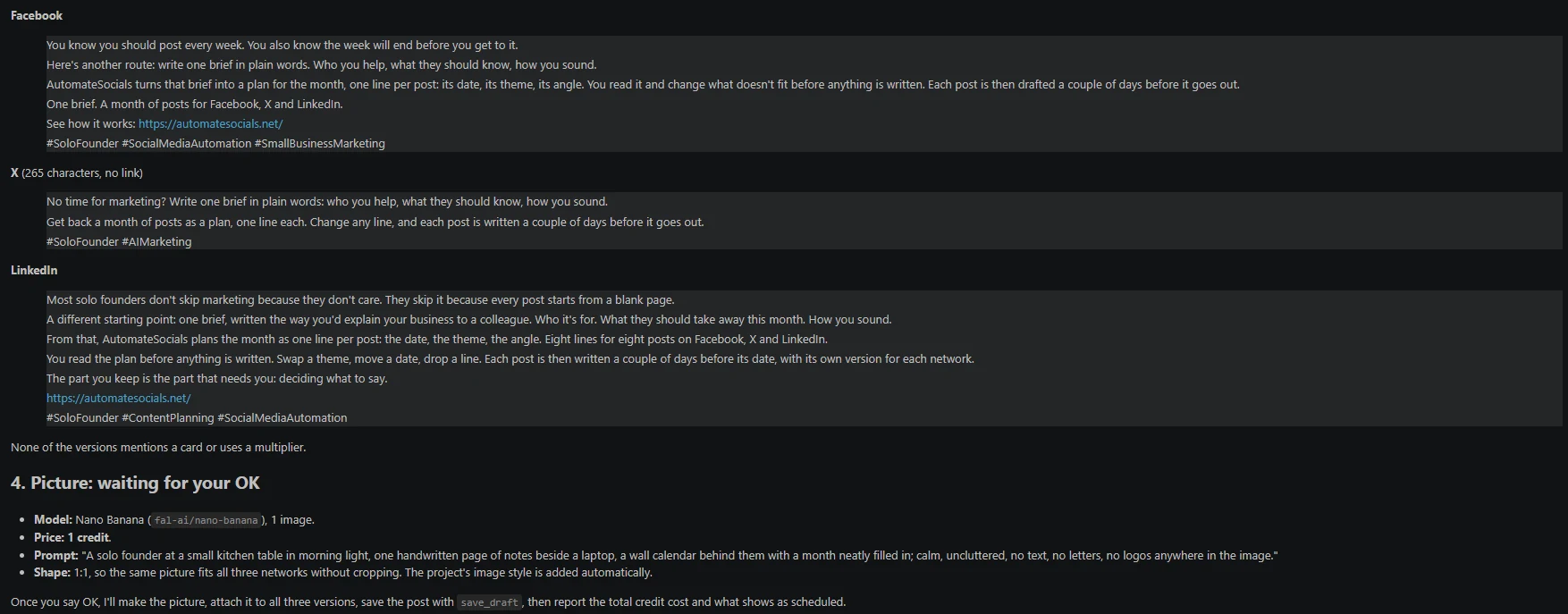
On Facebook it opened with the founder's week:
You know you should post every week. You also know the week will end before you get to it.
On X it squeezed the same idea into one line:
No time for marketing? Write one brief in plain words: who you help, what they should know, how you sound.
On LinkedIn it went longer and closed on a point of view:
The part you keep is the part that needs you: deciding what to say.
What stayed the same: the idea (one brief becomes a month of posts) and the plain, direct tone. What changed: the length and the opening line, one per network. The X version has no link; the Facebook and LinkedIn versions point to our website.
The honest limits
- •Generic input gives generic output. If your website and knowledge base say little, the drafts will say little too. Put your actual opinions in.
- •It writes from what you give it. The voice comes from your website, profile and knowledge base. Keep them current.
- •You review drafts. Publishing asks first and shows you the exact text and picture. Campaigns and workflows are the exception you choose: you approve them when you start them, and can pause them at any time. Edit freely; that's the point of the draft step.
FAQ
Can AutomateSocials write posts in my brand voice?
Yes. It writes on-brand posts from your project's website, profile and knowledge base, so the drafts start from your own words.
Where does it get my brand voice from?
From three inputs you control: your website, your project profile and your knowledge base. Adding your story, opinions and example posts makes the voice more specific.
Does it write a different version for each social network?
Yes. From one brief it writes a version for each network, shortening or expanding as needed, with its own picture per network where you want one.
Can I run several brands with different voices?
Yes. Each project is one brand or client, with its own accounts, voice, calendar and API keys.
Do I need a monthly subscription?
No. Writing, scheduling and publishing are free. Credits pay for generated pictures and video, reading other feeds and X's per-post fee. You get 50 free credits on signup, and credits never expire.
Which networks can it publish to?
Facebook, Instagram, X, LinkedIn, TikTok and YouTube, after you approve.
Let it write one post from your website
Give it your website, brief one post, and see whether it sounds like you.
Start free with 50 creditsSee how it works for the full flow.
Related articles
All articlesBest Practices for AI-Generated Social Media Content
Learn how to create authentic, engaging content with AI while keeping your brand voice. Best practices for knowledge bases, briefing the agent, pictures and quality control.
Read TutorialWhich AI agent can turn one brief into a month of social posts?
AutomateSocials turns one plain-words brief into a dated month of posts for Facebook, X and LinkedIn, writing each a few days ahead. You approve.
Read ComparisonAutomateSocials vs Buffer vs Hootsuite: 2026 Comparison
A fair comparison of AutomateSocials, Buffer and Hootsuite: how an AI agent differs from established scheduling tools in writing, pictures, publishing, reading competitors, analytics and pricing.
Read